
티스토리 뷰
1. 설치
brew install swiftlint
2. xcode 세팅
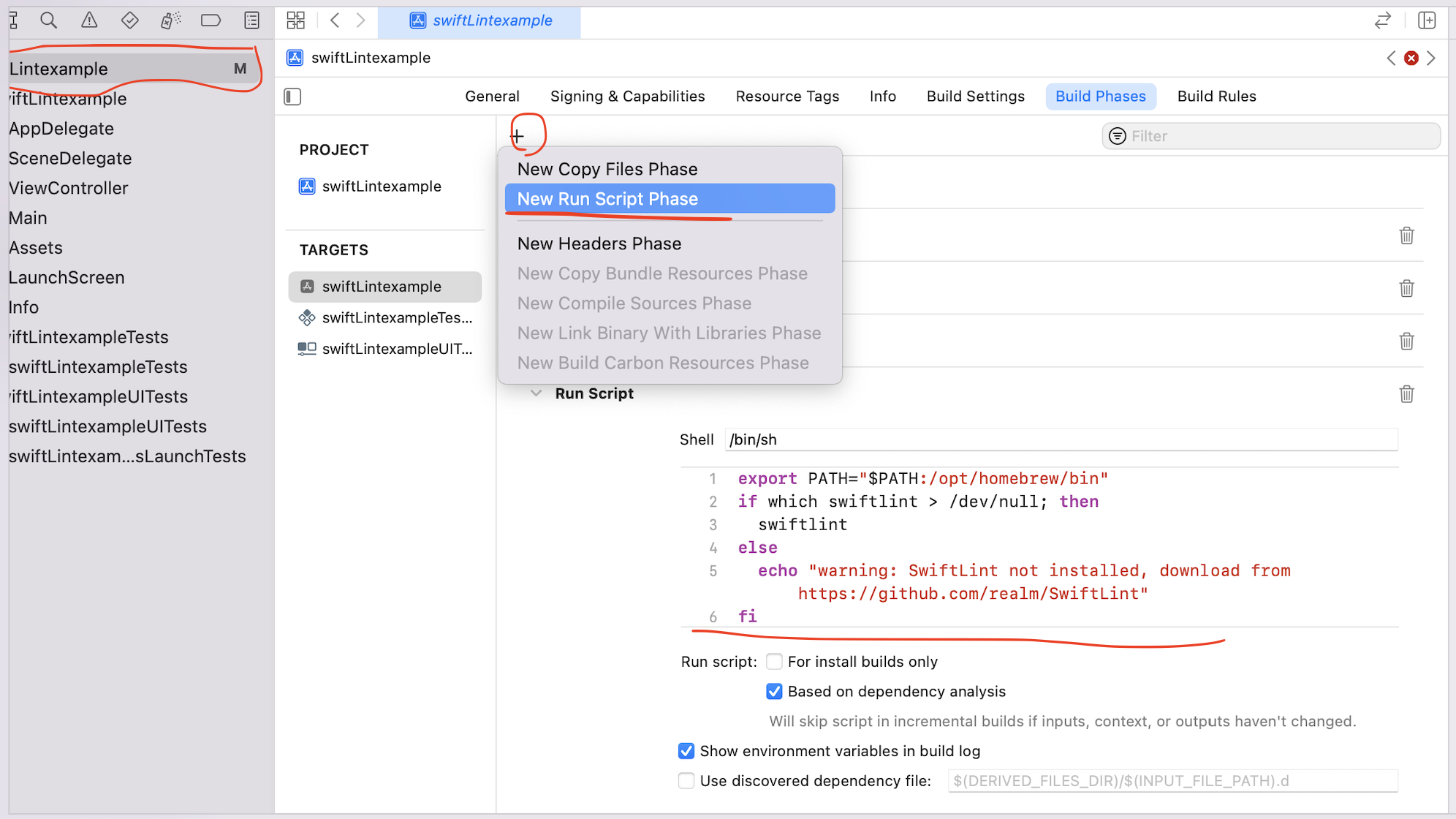
프로젝트 선택 하고 Build Phases 에서 + 눌러서 Run Script 하시고, 아래 내용 추가
export PATH="$PATH:/opt/homebrew/bin"
if which swiftlint > /dev/null; then
  swiftlint
else
  echo "warning: SwiftLint not installed, download from https://github.com/realm/SwiftLint"
fi
3. 빌드
빌드를 해보면 이전과는 다르게 워닝이나 에러가 추가 된 것을 볼 수 있다.

기본적인 적용 과정은 이제 끝났다고 보면 되고, 이제 필요한 것과 아닌 것 등을 구분해서 적용 하면 될 거 같네요.
2022.08.30 - [iOS/Project Related] - coding convention - swiftLint -2
coding convention - swiftLint -2
우선은 기본적으로 적용되는 1) 룰을 둘러보고, 2) 추가 하거나 제외 할 룰을 생각해보고, 3) 제외할 파일을 생각해본다. Default Rules block_based_kvo: Block Based KVO : \ addObserver 형태가 아닌 블럭 형태..
iosdevhistory.tistory.com
'iOS > Project Related' 카테고리의 다른 글
| coding convention - swiftLint -2 (0) | 2022.08.30 |
|---|
댓글
공지사항
최근에 올라온 글
최근에 달린 댓글
- Total
- Today
- Yesterday
링크
TAG
- chatgpt 4o
- RxSwift
- AWS IoT
- GCD
- ChatGPT
- ios
- geohash
- 코테
- 빌드자동화
- xcode whitespace trim option
- async
- CI/CD
- 같이쓰기
- IF (KAKAO) DEV 2022
- Default Rules
- bitrise
- swiftLint
- jenkins
- GPT4
- XCTestExpectation
- 프로그래머스
- 모듏화
- firebase
- Fastlane
- swift
- AppThinning
- ATS failed system trust
- 무료는 아니지만
- MQTT
- Moya
| 일 | 월 | 화 | 수 | 목 | 금 | 토 |
|---|---|---|---|---|---|---|
| 1 | 2 | 3 | 4 | 5 | 6 | |
| 7 | 8 | 9 | 10 | 11 | 12 | 13 |
| 14 | 15 | 16 | 17 | 18 | 19 | 20 |
| 21 | 22 | 23 | 24 | 25 | 26 | 27 |
| 28 | 29 | 30 |
글 보관함